
Suppose you found an amazing picture on the Internet, and you wanted to know who made it or where it was posted first. By using the Google Reverse Image Search tool you can find all the details regarding the picture.
It is a versatile service, that helps to find out the source of an image, look for a similar picture, or to get related materials. This has become a necessity, as the information on the net grows so do the searches for, authentic images as well as any information related to a picture.
Google Images handles around 4.5 billion searches per day, making it one of the largest search platforms in the world. By knowing its strengths and weaknesses, you can put it to full use and navigate through the world wide web to read more regarding any striking images that interest you.
What is Google Reverse Image Search?
Google Reverse Image Search is a feature that allows users to search the internet using an image instead of text. You can either upload an image or paste its URL to find similar images, sources, or related information online.
How It Works
Google analyzes the uploaded image by identifying key visual features such as colors, shapes, patterns, and pixels. It then compares these features with billions of images across its database to find matching or similar results. This process is powered by techniques like image recognition and image hashing, which help quickly identify visual similarities.
Overview of the technology:
Modern Google Reverse Image Search is powered by machine learning, computer vision, and artificial intelligence. These technologies allow the system to recognize images even if they are resized, edited, or of different quality. With the integration of AI and tools like Google Lens, image search has become more accurate, intelligent, and context-aware than ever before.
Types of Searches
There are two ways to use Google Image search:
- Image Upload: To perform a reverse image search Google, one option is that you can upload an image from your computer or the device.
- URL Search: Another option is that you can also use the search bar by copying an image URL and pasting it into the search bar to view similar images.
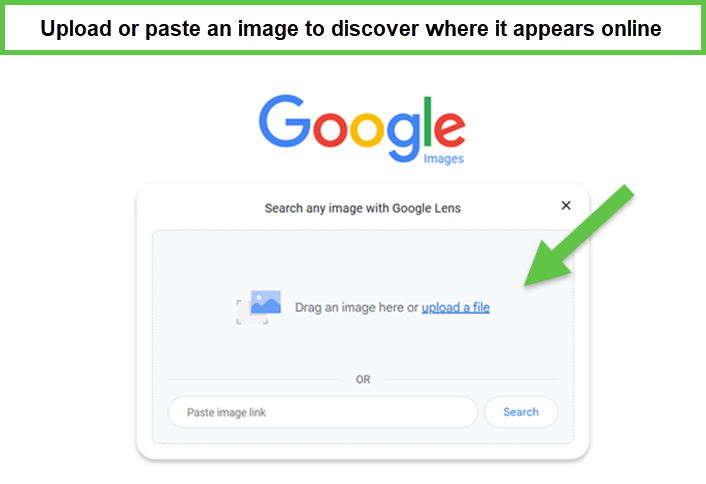 Google Reverse Image Search
3. Why Use Google Reverse Image Search?
As a flexible and necessary tool, Google Photo Search is useful in many ways for users from different professions. Regardless if one is a writer conducting his research for a news story, a scholar looking for material on a topic of interest, or an ordinary Net-savvy citizen, knowing how to google search an image is helpful. There are numerous reasons to utilize Reverse Google Search:
Identifying Image Sources
- Find the original image: With the help of a reverse image search Google we can work out the name of the individual photographer or artist, or the name of the website where the image was first used. This is one of the reasons why people use Google Images reverse search, to identify the sources of any pictures, users can easily track the first known usage of the image by inputting the image or pasting the URL of said image. This is very helpful, especially for those who are working on reporters, or research analysts who require confirmation of the authenticity of image material used in their research.
- Verify authenticity: Image finder can also find out if an image taken is original or has been tampered with in any way. Through a search by Image Google, one can reveal if an image has been tampered with or not. This is because when a user superimposes the two images the common features in the pictures can easily be noted and hence distinguish the forged image from the original one thus eliminating misleading information.
Finding Higher Quality Images
- Locate larger versions: Find even better images by using Image Finder for even better printing or image sharing.
- Discover different formats: The image finder also searches for the same picture however in a different format, for instance, JPEG, or PNG.
Discovering Related Content
- Explore similar images: Through Reverse image search Google we can search for images that are likely to be related to the entered keywords.
- Discover related articles: Search for articles, news stories, or websites that may include a picture or similar one.
Besides the identification and verification of an image, you can use Google Reverse Search to search for related content and ideas. Users can find similar images, articles, news, or websites that have used similar pictures or are related to them by image reverse search. This is useful for artists, graphic designers, and writers who are in search of new exciting ideas for their projects.
Google Images reverse Search is a really helpful perspective tool, which can help people navigate through the internet with ease and find out more about the things that interest them.
4. Google Reverse Image Search and SEO
Google Reverse Image Search is also important for SEO because it helps websites get more organic traffic, better rankings, and more visibility for their images through better optimization.
Enhancing Image SEO
Google Images Reverse Search provides a great number of tools that improve the visibility of images on websites and give certain advantages in ranking altercation. It also means that by knowing SEO and applying all the right tactics into play, you are helping your images rank higher within the search engine and bring in more organic web traffic.
Optimizing your images for SEO is one of the best ways to enhance your website’s SEO ranking factors. By following these best practices, with Google Reverse Image Search you can increase the chances of your images appearing in relevant search results:
- Use descriptive filenames: While there is nothing wrong with such titles as “image123.jpg”, give proper names, which describe what is depicted in the image.
- Add alt text: Alt text is a text description of the image and is used by the search engine. It should be brief, to the point, and must clearly describe the image.
- Optimize image file size: Larger images cause an increase in the loading time of the website, which hinders user experience and search engine optimization. Some tools can compress an image whilst maintaining its quality.
- Choose the right image format: The usefulness of an image format depends on what it is being used for and the kind of content it will contain. JPEG is mostly appropriate for pictures, while PNG is appropriate for images with transparent or clear edges.
- Use relevant keywords: Make sure that images are significant to the content, use relevant keywords in the image name, Alt text, and the surrounding text.
- Use reverse image search Google to find gaps: Through Google photo search, you can find images that are related to your niche and check the keywords that are used in the filename, alt attribute, and the text near the image. See if there are any gaps in your image SEO approach and address those gaps.
Competitor Image Analysis
To know the SEO strategies used by your competitors, a strategy advisable is to use Google Reverse Search to analyze the visual content posted by the competitors. Here’s how to search an image on Google for this purpose:
- Search for competitor images: This involves searching for pictures on your competition’s sites by entering the picture in Google Photo Search.
- Analyze image usage: Analyze how competitors are employing images on their sites and their positions, size, and even the surrounding context.
- Identify keyword usage: Investigate the keywords used in competitor image filenames and alt text and in the surrounding text.
- Compare image quality: See how your competitors’ images are performing and determine the gaps that can be filled.
Copyright and Image Attribution.
To maintain a clean record and legally secure website, it is crucial to use images properly – know who owns the image. That can be achieved by Google Photo search.
- Avoid copyright infringement: Make sure that one gets the right permission or credits for some images to avert some compounding of law.
- Use royalty-free images: Think about obtaining royalty-free images that permit business utilization without requiring copyright reference.
- Obtain permission: However, if you have to use a picture but cannot use a royalty-free one, be sure to get permission from the owners of the image.
- Provide clear attribution: When using images copyright or license, make sure to put the creator’s name, source or link, and licensing information somewhere prominent.
- Adhering to such guidelines, and by using Google reverse search you can properly optimize images for search engines, study competitors’ actions, and provide the necessary and proper attributes to the images you put on your site, thus enhancing the success and visibility of your website.
5. Limitations of Google Reverse Image Search
While Reverse Google Image Search is a powerful tool, it has some limitations:
Accuracy Issues
- Similar images: In some cases, selected images may be similar but shot from a slightly different angle or taken at a different time. In this case, a search by image might not be a hundred percent accurate in finding what you are looking for.
- Outdated results: This means that the resultant database may be outdated, meaning its results are also out of date.
Image Variability
- Altered images: Sometimes while using image reverse search it is hard to find the source of the image if it has been altered in any way.
- Cropped images: Whenever an image has been cropped using Google Images search might not give the required result as it is difficult to tell the size of the full image.
Privacy Concerns
- Data collection: Google records searches that are made and preferences that are set even the searches conducted through Google picture search.
- Image misuse: It is better to avoid putting your pictures on the internet as they can be misused.
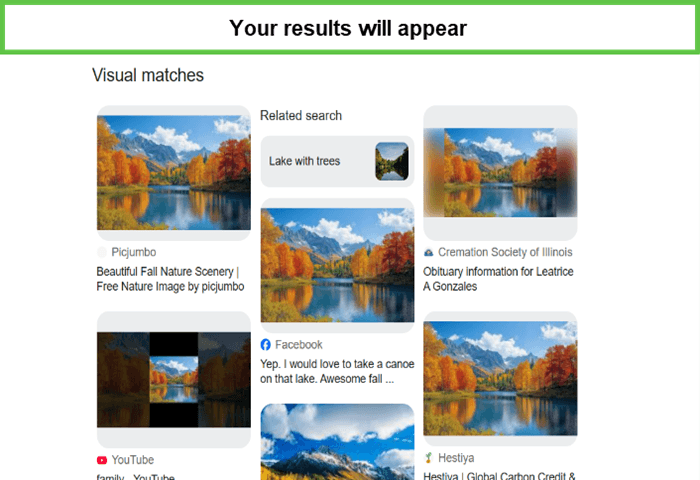
6. Step-by-Step Guide on How to Reverse Image Search
The following is a step-by-step process on how to do a reverse image search by using a desktop and a mobile so you can search image on Google through the comfort of what you find easily:
How to search an image with Google Reverse Image Search on a Desktop?
To search image on Google through your desktop follow the steps:
- Go to images.google.com.
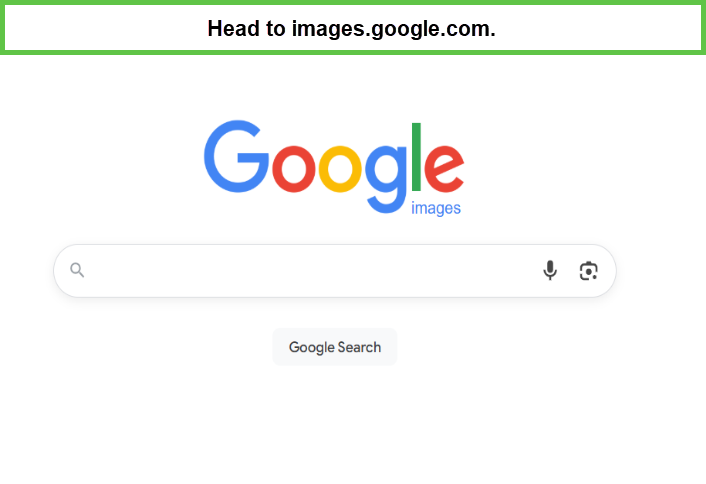
- In the search bar click the camera icon.
- Provide an image directly or insert its URL.
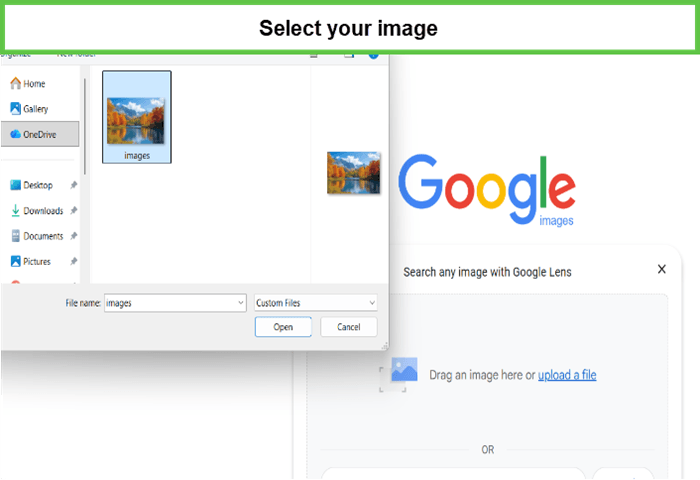
- Click “Search by image.”
How to search an image through Google Reverse Image Search on Mobile?
To search image on Google through your mobile follow the steps:
- Open the Google app.
- Click on the icon that resembles a camera at the search bar.
- You can provide an image by either uploading it or by just pasting the URL of the image.
- Tap “Search by image.”
By following the guide you can easily search by image Google.
8. Conclusion
Google Reverse Image Search is recommended for anybody who has to find related content, or improve their research on the Internet. Search by image Google has proven to fit every human need across different fields. Researchers can easily search regarding their topic with a picture. A patient can access all the information of their medicine, a product can be bought by searching a picture.
FAQs
Q) What does a reverse image search do?
A reverse image search can search the internet using an image as your search input. It can search for that image or images close to it using an image or a Web address of the image. It can be especially helpful when determining the context of an image, to find better quality copies or similar materials.
Q) How do I do a reverse image search on my phone?
For anyone wondering how to do a reverse image search on your phone, you can use the Google picture search or a reverse image search app. In the Google app, open it and touch the camera icon near the search bar, type in the desired image, or paste it directly by accessing it from your gallery. In any other reverse image search app, you need to follow the app’s instructions on how to upload an image or paste the image URL.
Q) Is reverse image search safe?
Reverse image search is pretty harmless for the most part, but one must be careful when uploading pictures. Ensure that you set the right privacy and do not post pictures that may have sensitive details. Also, note that some websites may contain information about your search history and or preferences.
Q) What is the meaning of reverse image?
Reverse image can be described as the general outcome of a search query wherein an image is provided as the search parameter. It works by comparing the features of a picture uploaded or pasted against an image database to locate similar pictures or matching ones.
Q) How to reverse image search on mobile?
To reverse image search on mobile, follow these steps:
- Open trace image search in Google or download a reverse image search application for mobile.
- Click on the camera icon in the search box.
- You can either choose an image from your camera roll or you can input the image URL instead.
- Tap “Search by image.”
Q) Can I search for a person by photo?
Yes, you can search for a person with the help of Google Image Search if you have a photo of that person. However, the effectiveness of these results may also depend on the quality and the data which can be found on the internet.
Q) How to do reverse image search tricks?
Use the “Tools” option: Further narrow your search by image size, color, and kind of image.
Try different search engines: Check out the search in Bing, Yandex, and TinEye for the different outcomes.
Use image editing software: Correct the changed images to avoid the vagueness of the search results.
Q) How to reverse image search on Windows 11?
Google image search on window 11 is the same as on any regular pc or desktop
- Go to images.google.com.
- In the toolbar at the top of your window, click the search bar and then click the camera icon.
- Choose an image out of the gallery or provide the website link to the chosen image.
- Click “Search by image.”